This article was translated from Japanese by AI. The original is at https://blog.semnil.com/post-1348.html
The YAMAHA URX series (URX22, URX44, URX44V) are audio interfaces with built-in DSP effects and a mixer. You can control some functions by pairing them with Steinberg software (Cubase, Nuendo, MixKey) or with controllers such as the Stream Deck and CC1, but fundamentally these are devices meant to be operated from the unit’s own touchscreen.
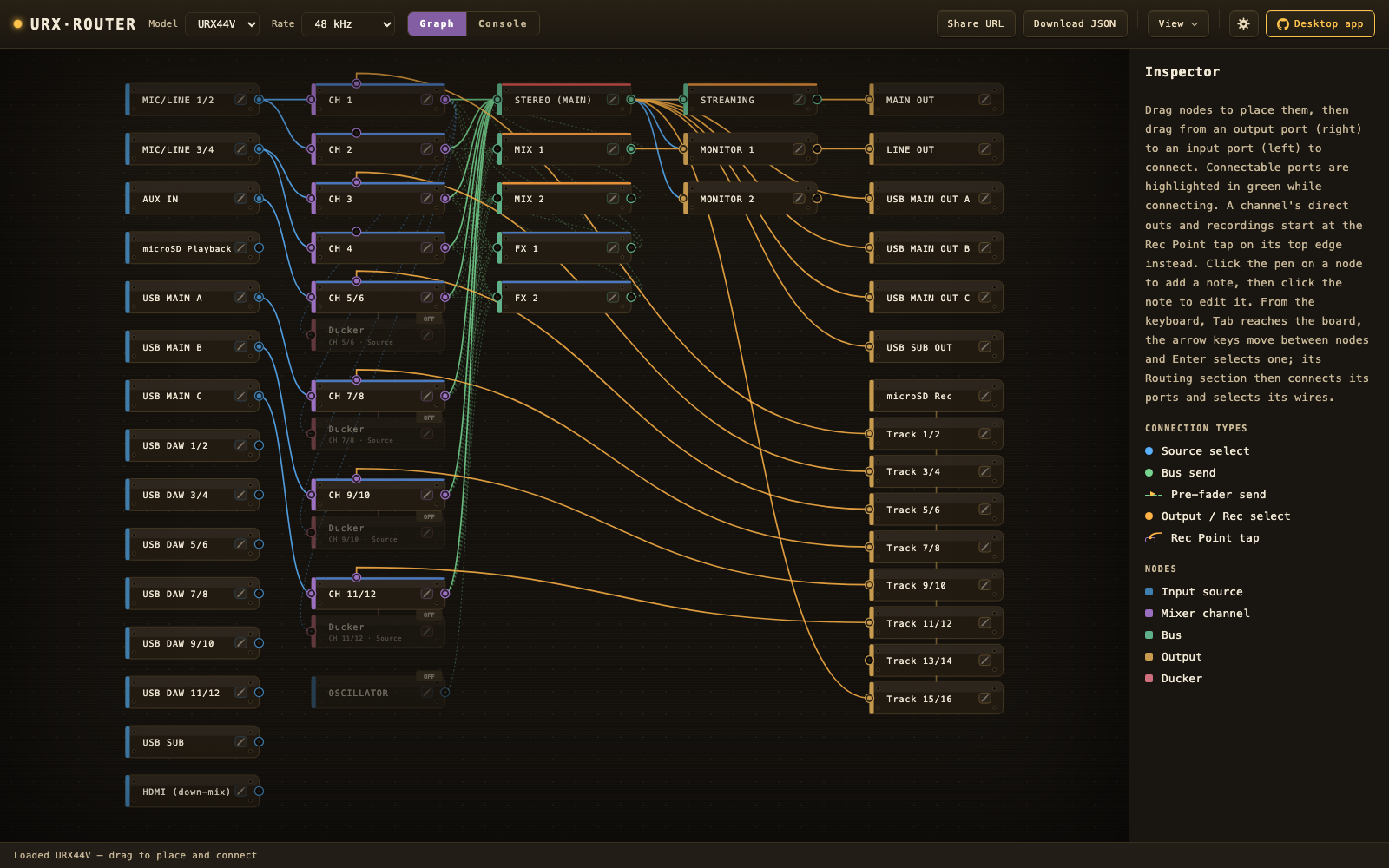
That said, I kept coming across opinions that its internal routing is complex and hard to follow, and that being able to control it from a PC application would be convenient — and after buying one myself, I had my own thoughts about it too. So I built URX Router as an unofficial application.
- Browser demo (no install; no save dialog, image export or device connection — instead you can drop a plan JSON onto the window to open it, share a plan as a URL, and download the plan JSON): https://urx-router.semnil.com
- Desktop (Windows 11 / Apple silicon macOS): GitHub or Gumroad
Below, I summarize the points where I find operation difficult using only the URX hardware and the official ecosystem.
Constraints that get in the way of real-world use (as of 2026-07-05)
There is no dspMixFx for the URX
dspMixFx — the app for controlling the UR-C / URX-C series from a PC — does not target the URX22 / URX44 / URX44V. If you expect to drive them from dspMixFx the way you did with earlier models, it won’t work as you imagine.
So you operate from the unit’s touchscreen — but the mixer screen only shows up to 4 strips at once. You switch between the mono channels CH1–4 and the stereo channels CH5/6, 7/8, 9/10, 11/12 (CH5–12); you can’t lay out and survey every channel on a single screen.
The official Stream Deck plugin (Yamaha MGX/URX Plugin)
Elgato Stream Deck plugin for the MGX / URX series is officially provided. Its actions are things like raising/lowering channel and bus levels, ON/OFF (mute), CUE, PAN/BAL increment, ON/OFF of processing blocks such as HPF, GATE, COMP, EQ, INS FX and the ducker, and source selection for STREAMING / MONITOR — mostly one-touch toggles and step operations.
You cannot edit the actual parameter values inside the EQ or dynamics, edit routing, or move a fader continuously (levels are step increments only). Also, as of plugin version 1.1.0.0 every action is key-oriented; there are no actions for the Stream Deck+ dial controls.
DAW Integration in Cubase / Nuendo / MixKey
Cubase / Nuendo have an integration screen for the URX (Software Integration) and support control from within the DAW. However, it is available only while each application is running, so using it for streaming or meetings — cases where you aren’t running a DAW — comes with some difficulty.
MixKey is another compatible application, and it is itself a PC-side software mixer aimed at streaming. Channels you add can also control the URX’s built-in DSP. On top of per-channel parameters (low-cut, Direct Monitoring, etc.), you can open editors for DSP effects such as EQ and INS FX. On the other hand, control is basically tied to the unit of each added channel; there is no feature for surveying and editing the URX mixer as a whole (all channels, buses, routing).
To sum up, the official options and what I ultimately built — URX Router — compare as follows.
| Option | Provider | What it does | Constraint |
|---|---|---|---|
| dspMixFx | Official | — | The URX series is out of scope (it targets UR-C / URX-C) |
| Stream Deck plugin | Official | One-touch operations: channel/bus level up-down, mute, CUE, ON/OFF of processing blocks, etc. | Cannot edit parameter internals or routing; no dial-oriented actions |
| Cubase / Nuendo DAW Integration | Official | Control from the DAW’s integration screen | Only while each application is running |
| MixKey | Official | PC-side software mixer + per-added-channel control of the URX’s built-in DSP (EQ, INS FX, etc.) | Cannot survey the whole mixer or edit routing |
| URX Router | Unofficial | Read / write / live-sync the full mixer + routing visualization and planner | Unofficial, no warranty. Verified on real hardware for the URX44V and URX22. Some parameters are touchscreen-only (not writable) |
I don’t own the CC1 so much about it is unclear to me, but I assume it is similar to the Stream Deck + MixKey.
“Regardless of whether a DAW is running, read and write the URX’s entire routing setup from a PC and see the whole thing at a glance” — there is no official option that satisfies this. That was my first motivation.
Even on the unit, the signal flow is invisible
There is another motivation, separate from the control path: on the URX, the signal flow itself is extremely hard to see.
The full picture of the URX’s signal flow is drawn only in the official block diagram (PDF), and the unit’s touchscreen shows a limited set of functions on one screen at a time. The hardware gives you no way to list which paths are actually live.
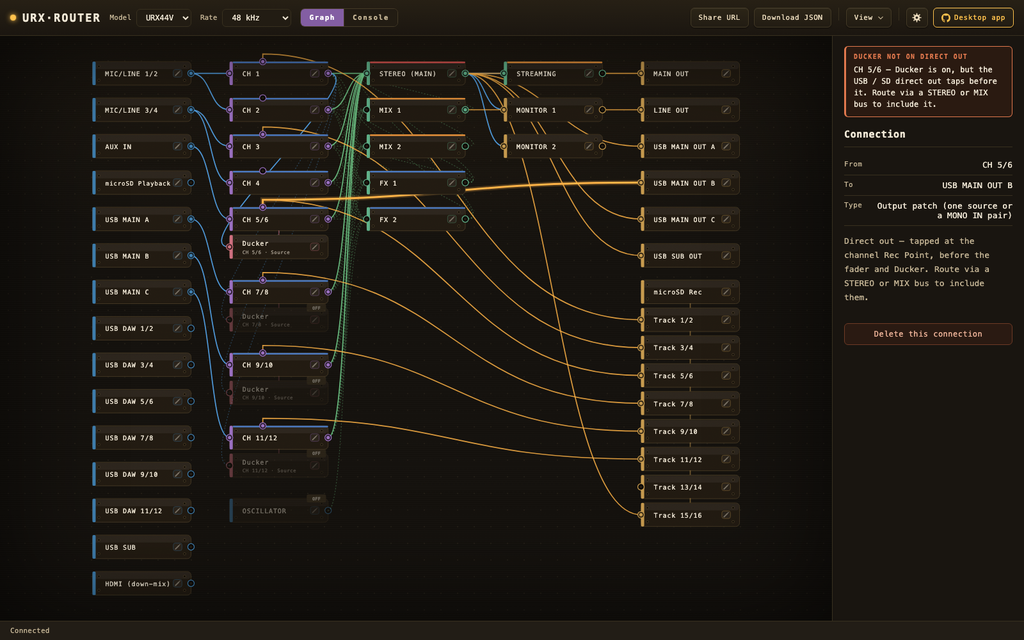
Moreover, some of the settings that determine the outgoing sound are very hard to confirm from the screen. A prime example is a channel’s direct output. The channel → USB / microSD direct output is determined by the channel’s Rec Point setting. Because this is a stage before the fader and ducker, turning the ducker ON does not apply ducking to the direct output. To send a signal that has passed through the fader and ducker, you have to route via the STEREO / MIX bus — but from the unit’s screen it is nearly impossible to notice this difference.
In fact, in the comments on a URX44V review video, someone posted a question (in Italian, paraphrased): “Ducking works on the monitor output, but it isn’t applied to the signal sent to the PC (OBS streaming) over USB. Is this a routing problem, or is it simply unsupported?” Something that would be obvious at a glance if you could see the signal flow is very hard to arrive at. Helping with exactly these spots through visualization and warnings is the second motivation.
What I built: URX Router
URX Router is what I built for the motivations above. The main features are as follows.
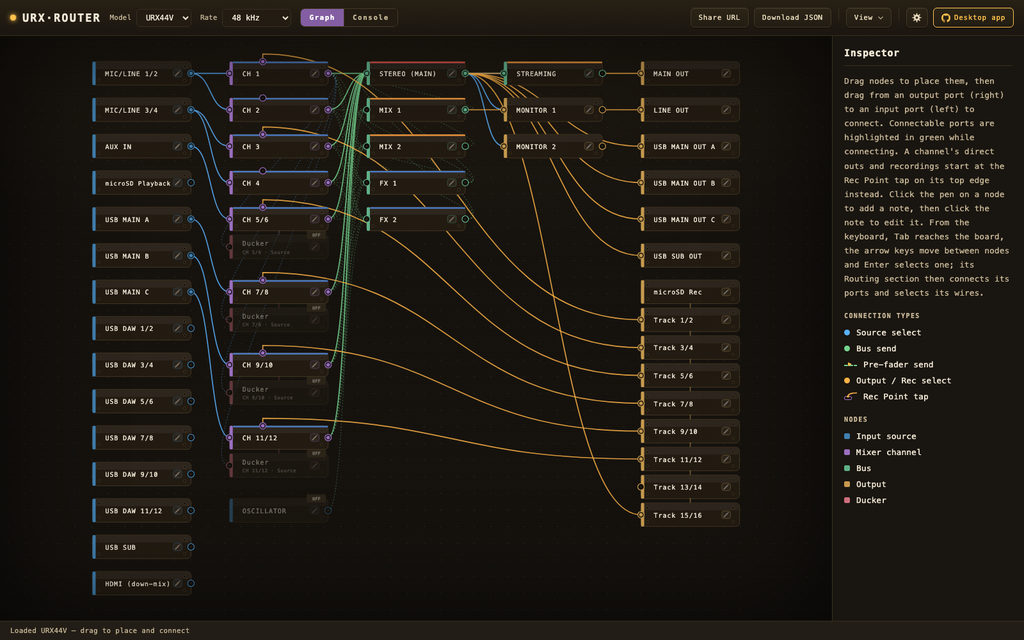
- Routing planner: Based on the official block diagram, it visualizes inputs/outputs, mixer buses and output patches as a node graph. You can only wire connectable routes, and PRE (pre-fader) sends are drawn distinctly with a dashed line and a “PRE” marker. Plans can be saved as JSON and exported as images.
- Routing warnings: If a channel with the ducker ON is wired to a USB direct output, it warns that “ducking is not applied to the direct output” (the case in the comment above). It also notes sample-rate-dependent unavailability, such as INS FX / FX2 above 96 kHz and stereo-channel EQ at 176.4 / 192 kHz.
- Device control (unofficial): While Device Center (bundled with TOOLS for MGX / URX) is running, it supports reading the unit’s current settings, writing settings, and live sync that continuously reflects the setting state both ways (some parameters are touchscreen-only and not writable — see below).
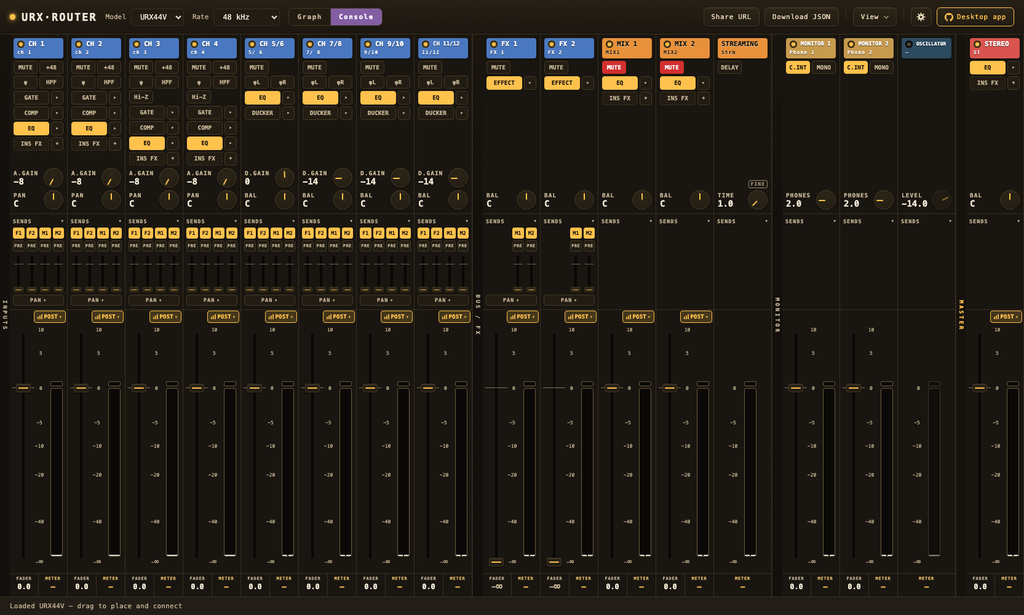
- Console view: Shows the same settings as a mixer surface (per-strip fader, mute, EQ, dynamics, sends). Live meters run during live sync.
- Tuning screens: Gate, Comp, EQ, Ducker, SSMCS, the insert effects (INS FX) and the FX channels’ effects each get a screen of their own. Thresholds are dragged directly on their meter, and the EQ curve is drawn from the measured frequency response.
- External MIDI controller assignment: Operate the console and the tuning screens from a physical controller.
- Other: share a plan as a URL (opening the link reproduces the same plan), open plans by dropping them on the window, and batch-apply the unit’s SETUP > GENERAL settings (brightness, auto power off, date/time, language, User Defined Knobs).
It also already tracks the parameter added in firmware V1.3 (STEREO bus assign ON/OFF).
Verification status and disclaimer (as of v1.18.2)
- Parameter support and the factory default plan are verified on real hardware for the URX44V and the URX22. The URX44 is assumed identical (apart from HDMI-related items) and is not verified on hardware. If you own a URX44, help with verification is very welcome!
- Some parameters cannot be written from URX Router due to the hardware’s specification (CH → FX send PRE/POST, and the SD recorder’s Track Count — both can only be changed from the unit’s touchscreen). During live sync it reads and displays the values from the real hardware.
- The confirmed working combinations (firmware / Device Center versions) are listed in the repository’s known-issues.
- This is an unofficial tool and comes with no warranty. Writing overwrites the current settings on the real hardware. Use at your own risk; see the disclaimer in the repository for details.
Get it
- Browser demo (no install; no save dialog, image export or device connection — instead you can drop a plan JSON onto the window to open it, share a plan as a URL, and download the plan JSON): https://urx-router.semnil.com
- Desktop (Windows 11 / Apple silicon macOS): GitHub or Gumroad
Yamaha, URX, CC1, Cubase, Nuendo and MixKey are trademarks or registered trademarks of Yamaha Corporation or Steinberg Media Technologies GmbH. Stream Deck is a trademark of CORSAIR (Elgato). URX Router is an unofficial tool and is not affiliated with any of these companies.


コメント